

|
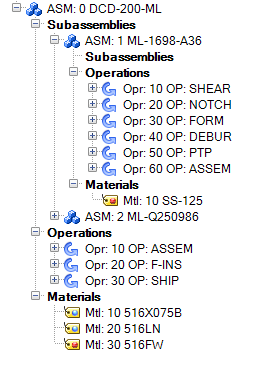
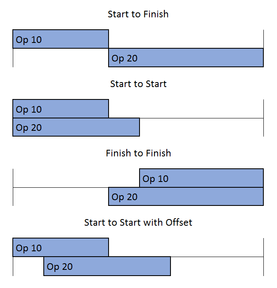
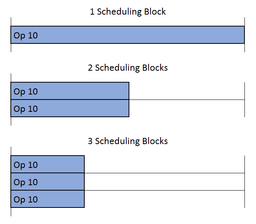
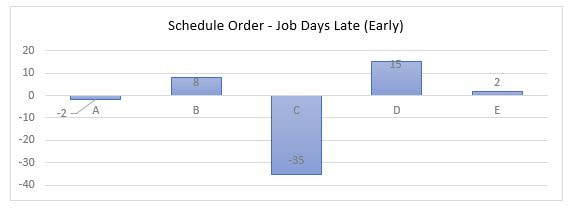
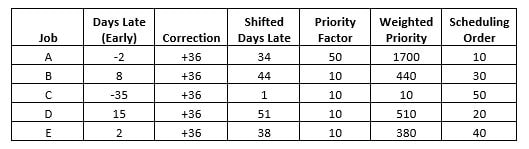
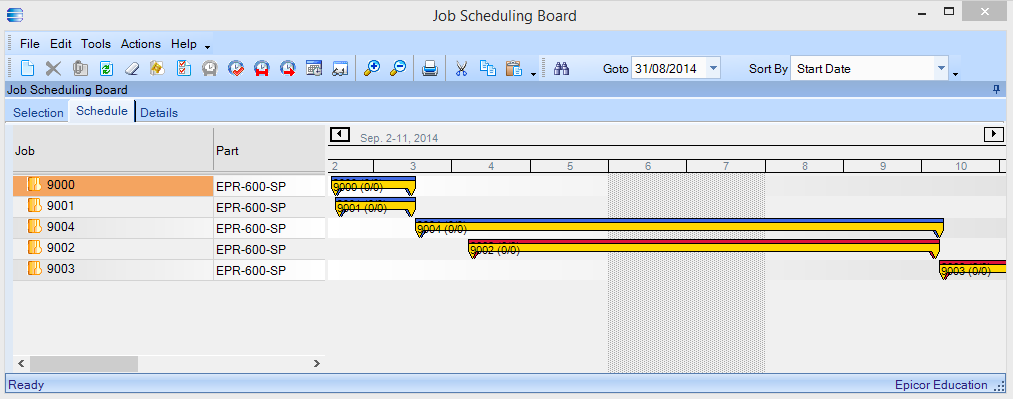
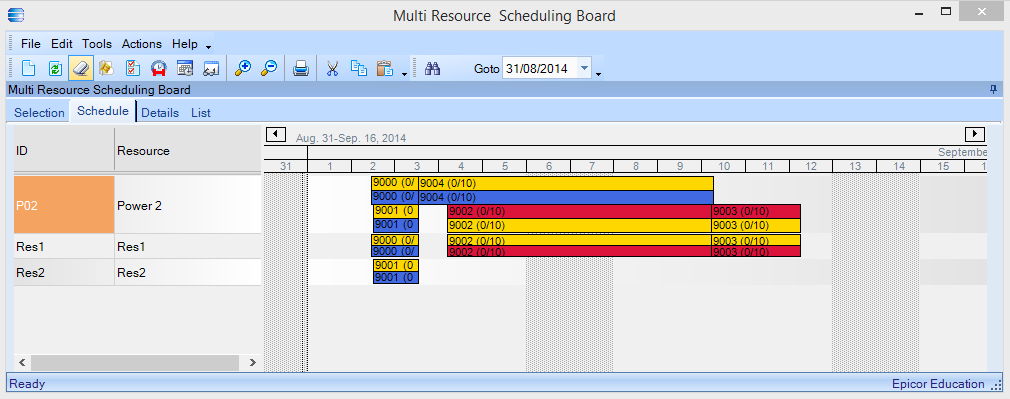
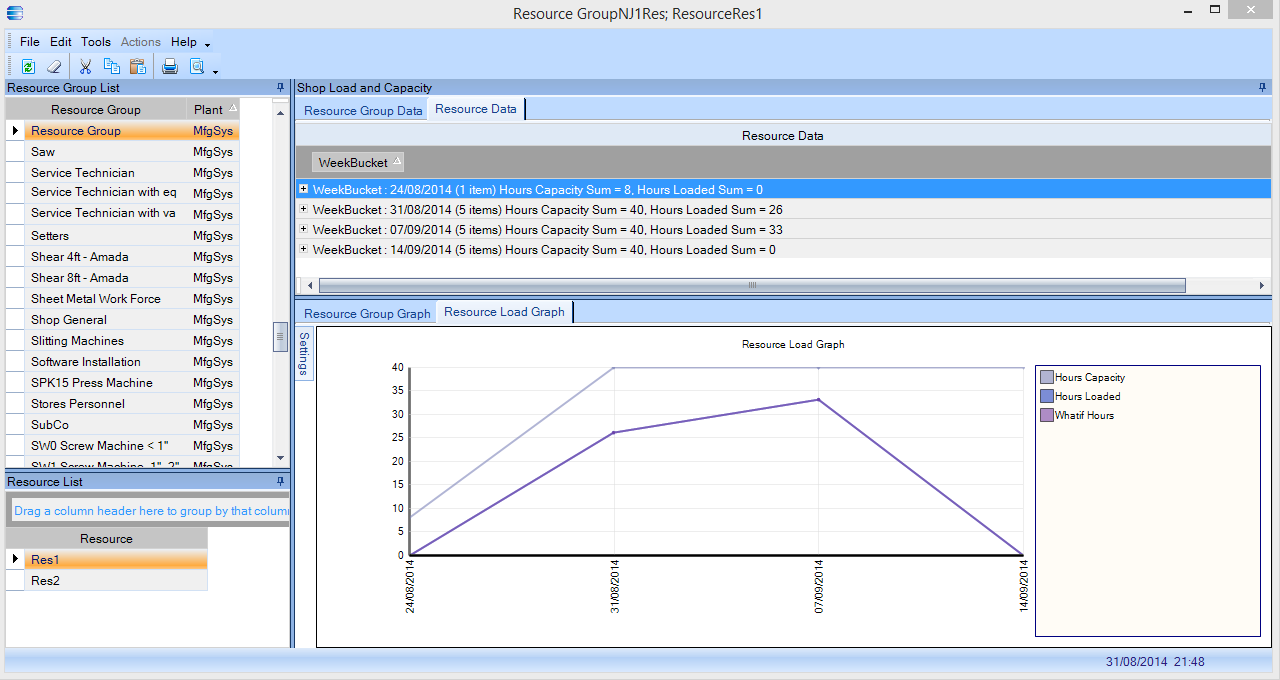
Epicor customers will often think that by implementing advanced planning and scheduling within their organisation that all the heartache and woes of a real life production environment will be resolved. The reality of advanced planning and scheduling (APS) is that it will seldom satisfy these high expectations on your first attempt. This is not necessarily down to the incorrect operation of the software but can often be down to the misunderstandings of your own organisation. As the old IT proverb goes, garbage in garbage out (GIGO). What is highly common within manufacturing businesses is an over optimism when looking at the times required to complete manufacturing processes, within the world of Epicor we refer to these processes as operations. If you were look at your own business and find 3 operators whom perform the same semi-skilled task, I'm sure if you asked each of them how long the task would take to complete you may arrive at a minimum of 2 different answers. So which time do you choose to be your operational estimate? To start with using an average would be the sensible option provided the times given are considered realistically achievable. You will usually find the more skill driven the operation the harder it will be to estimate the time required; with less skill and / or more automation operation times will inherently be more accurate. When modelling your real life processes within Epicor for each of your products or services you will need to define a method of manufacture (MOM). The MOM can consist of both materials (BOM) and operations (BOO). The MOM can be engineered to order and created within the quote, pre-engineered through the engineering work bench or created within the job on the fly. Before you can schedule production an Epicor job must be created which will hold all details of the MOM. The diagram below shows a typically example of an Epicor MOM. The most important thing to remember when creating your MOM is that you want it to best represent your standard practices and for at least in the early days ignore what small exceptions might occur. Every business can be very different in terms of their processes but Epicor can offer a multiplicity of options when creating the MOM. The following describes not all but some of the functionality available in APS for Epicor ERP. Bill of Materials – The BOM defines what materials are required to complete a product or process. The quantity of material can be set to be proportional to the quantity of goods being produced or they can be set to a fixed quantity regardless of the production quantity. The BOM can consist of purchased and manufactured materials; manufactured materials can be set to pull from stock or to be made part of the job contained within sub-assemblies. Sub-assemblies can also be setup as phantom boms where on job creation the sub assembly explodes and part materials relocate to the next assembly level. Each material can be associated with specific operations contained within the BOO. In scheduled jobs which can span several days or weeks, this will dictate the time and date in which the material is required. Bill of Operations - When setting up the BOO multiple operations can be stringed together in a sequence and dependencies can be added by the use of sub-assemblies which in turn can contain further sequences of operations and further sub-assemblies. Against each operation a time element is specified, the time the operation takes to complete can be proportional to job quantity or can be fixed. Scheduling Relationships – Dependencies of operations can be further refined by the use of the scheduling relationship. A string of operations are commonly set to start when the previous operation has finished, within Epicor you also have the ability to schedule a sequence of operations to start or finish together. If using start to start scheduling further refinement can be made by using the send ahead offset where by you can set what quantity or percentage of operations to be completed before the next operation can be started. The following diagram below shows operations over time with the various scheduling relationships available. Resources - Within Epicor both people and machines can be considered a resource; a group of people or machines which can complete the same tasks are collected together in resource groups. Resource groups or individual resources are appended to operations as scheduling requirements. Essentially anything that can be considered as a constraint (aside from materials) can be setup and considered a resource scheduling requirement. For example a manufacturing plant may have several machines but not all machines can be run simultaneously, not because of a limitation on available operators but because of a limitation on the available power to the premises, therefore against this type of operation we could append the machine, the operator and the power consumed as scheduled resource requirements. Resource Capacity - When setting up resources we have the ability within Epicor to define its capacity typically by the calendar, specifying the number of operational hours in a day and working days in a week in which the resource is available. Consider however that a machine can be available 24/7 but unless you always have an operator to run it you will always be bound by the operator as being one of your primary constraints. Additionally we can specify a daily or concurrent capacity whereby the unit of measure is anything you want it to be. An example of a daily capacity could be where a machine could not exceed a stated level of emissions in a single day. In the example of required power being a scheduled resource, this would suit a setting of a concurrent capacity in kW’s; this would allow multiple operations to be scheduled against a single resource until the stated concurrent capacity is reached but not exceeded. Finite or Infinite Capacity - Although capacity for a resource will be defined you are not necessarily fixed by this constraint when running APS as you can still set resources to have an infinite or finite capacity. If setting a resource to be infinitely scheduled then there is potential for the scheduled load to exceed the available time. There is nothing wrong with running your scheduling this way as you still have the ability to measure by how much your available resource capacity has been exceeded by the demand for which you can act accordingly. Conversely if your resource is finite then the APS scheduler will never exceed the capacity, again there is nothing wrong with this method but I would advise against it in the early days of running APS until such time you have passed through the GIGO phase. After this phase you would typically end up with a mixture of infinite and finite resources where the bottle necks in your production would generally be set to finite. Queue and Move Times – As products move through production it is unlikely new operations are started as soon the previous operation dictates. There can often be a time lag within your production where materials may take time to be moved to another location in the factory or a small element of time is required as a buffer. Within Epicor we can set queue times on the start of operations or move times on the end of operations. This time element does not consume any resource capacity but are used to create gaps between scheduled operations which are considered a realistic reflection of your production. Setup Times - Time can be added to the start of an operation for which the length of time required for setup is not bound by total quantity of parts being produced, however setup times are not necessarily fixed as they can also be variable by the use of scheduling blocks to define the number of resources which can be utilised during a single operation. Scheduling Blocks - Imagine you have 3 machines which can complete the same operation, against the scheduled resource group I can set a scheduling block value of 3 meaning that I can run the operation on up to 3 machines simultaneously and thus reducing the process time to 1/3 of its original. When the APS schedules this operation it will firstly look for available capacity on 3 machines, if this capacity is not available it will look to schedule the operation against 1 or 2 machines depending on the availability of machine resources. The following diagram shows how process times can be reduced by the use of scheduling blocks. It is only advisable to use scheduling blocks if this is typical of your production environment; also bear in mind that if scheduling operations against 3 machines then you may require 3 individual setups increasing the accumulative process time and potentially the cost. Constrained Materials – A key constraint to scheduling can be materials, after all what is the point in scheduling without knowing the availability of materials. Within Epicor not all materials have to be considered as constraints, instead Epicor allows you to choose which materials should be treated as constrained. What one business may consider to be constrained material can be different in another; Typically constrained materials may be purchased parts on long lead times or they maybe materials which a business chooses not to stock due to their infrequent use. Constrained materials can be both purchased and manufactured parts. When planning with constrained materials the APS scheduler will not consider to start an operation until all related materials can be expected to be available. This means that again scheduling can be influenced by the GIGO effect. Your production planning has the potential to be largely influenced by your Purchasing department. Without good management of open purchases and regular maintenance of purchase lead times the use of constrained materials when planning via APS can be a non-starter. Global Scheduling - Within APS global scheduling can be used to automatically reschedule Epicor jobs to suit the changes in your manufacturing environment. The global scheduler will consider both the availability of materials and the scheduled resources. The global scheduler will stick within the rules of the parameters you have set and will not exceed resource capacities or ignore material constraints assuming you have chosen them. The Global scheduler is not a magic box, it simply follows a logic and schedules jobs in order of their priority while sticking within the rules you have defined. What is more important than the use of the Global scheduler is understanding the calculation of scheduled priority; this is handled by the Calculate Scheduling Order Process. Calculate Scheduling Order – To calculate the order of scheduled priority, firstly all jobs are hypothetically scheduled forward with an immediate start date based on an infinite availability resources but still sticking within the resource calendars and material constraints. This returns a theoretical optimum date to which a job can be completed; this date maybe before or after the job required due date. From this a days late value can be calculated, jobs hypothetically scheduled before the required due date would have a negative days late value. Once all jobs are scheduled the job with the lowest value of days late would be used to calculate a correction value. If the earliest job is 35 days earlier than it required due date then the correction value would be 36 (35 + 1). The graph below shows jobs A to E where the days late value has been calculated, job C has the lowest day’s late value of -35. The correction value is added to the calculated days late of each job to give a shifted day’s late value and this is in turn multiplied by a priority factor to give the weighted priority value. The priority factor is taken from priority code stored against the job. There are six priority codes setup within a standard system but they can be amended to be business specific, the higher the priority factor number the more likely the job will be at the front of the global schedule queue. The job with the highest weighted priority will have a scheduled sequence of 10, the second highest will have a scheduled sequence of 20 and so on and so forth; the higher the weighted priority then the lower value of scheduled order it will have. The following table shows Jobs A to E whereby the shifted days late, weighted priority and scheduling order has been calculated. Notice that although Job D has the highest days late value it is not the first in the scheduled order due to Job A having a greater priority factor. Manual Scheduling – When using APS it is not mandatory to use Global scheduling, for Production environments with a relatively small number of jobs you can choose to manually schedule all jobs and still stick within your defined rules of available capacity and materials. For larger production facilities there will always some element of manual scheduling combined with Global scheduling. What If Scheduling – When scheduling jobs either manually or globally you have the ability to schedule in an off-line mode where your real schedule is not affected until you choose too. This can be particularly useful when trying out different scheduling scenarios. What if schedules can also be saved and reloaded as and when required. Job Scheduling Board – The Job scheduling board gives the planner the ability to view production in a gantt chart format. Whole jobs are displayed and can be manually re-planned by dragging and dropping jobs to different locations on the chart. The chart is colour coded to show where jobs maybe on time, late or part completed. All planning within the Job scheduling board is in What if mode until you decide to commit the schedule. Multi Resource Scheduling Board – The multi resource scheduling board is very similar in appearance to the job scheduling board but displays only planned operations against a selection of chosen resources. Operations can be re-planned by dragging and dropping individual operations, before the operation is rescheduled you have multiple options to schedule the operation only, the entire job or any proceeding operations. Resource Load Graph – The resource group load graph can be used to quickly see a picture of load against individual resources or resource groups overall. The graph will plot capacity, current load and what if load. There are a multiple of other tools and options available within the Epicor APS module, once you have mastered them and can accurately model your production environment the hard work still needs to continue. An ongoing maintenance is required for all system data including the managing of open jobs with timely and accurate completions, open purchases and part lead times, and the changes to your available resources with considerations to down time and maintenance.
If your company is interested in Epicor APS or other Epicor ERP solutions please get in contact via the details below and unlock the potential in Epicor ERP.
2 Comments
Robert Ortiz
8/14/2020 02:30:59 pm
Where can I find a color code key to tell me what the colors on the graph represent?
Reply
B.J. Camire
9/2/2020 07:28:36 pm
On the menu bar, the fifth icon over by default is a clipboard with a checkmark on it. The options menu it loads will allow you to set the colors.
Reply
Leave a Reply. |
Archives
November 2025
Categories |


RSS Feed